To clarify, Device Control is not enabled by default. When the Device Control module was first introduced on macOS, users may have received a prompt within the ESET program to enable it manually. If it is currently active on the device, it is likely that it was enabled by the user at that time.
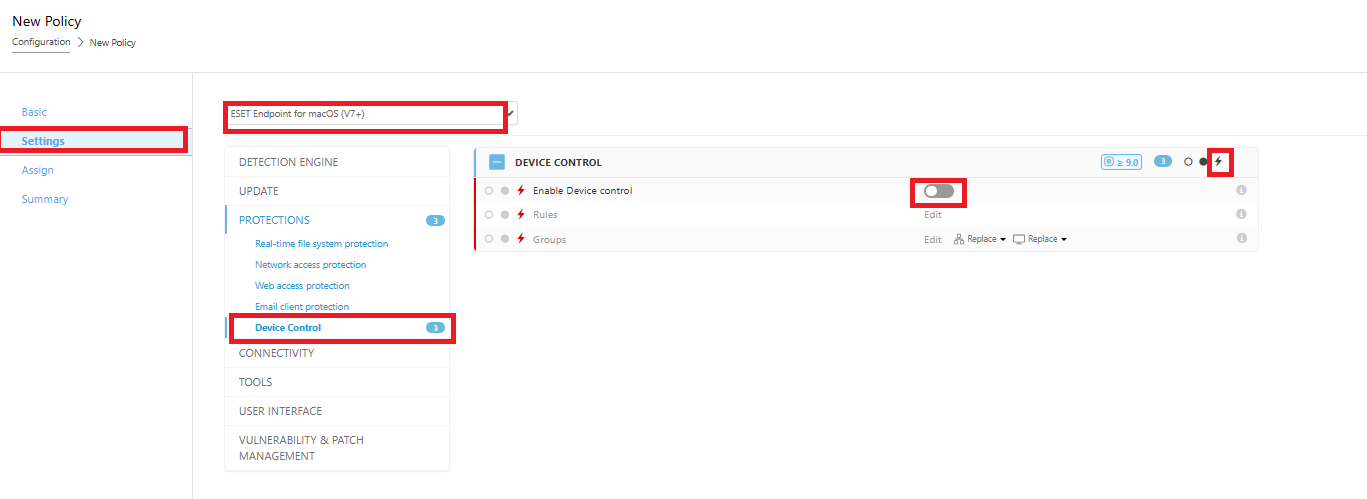
If you would like to fully disable Device Control and prevent the end user from modifying the policy via the ESET program, please follow the steps below:
1. In ESET PROTECT, navigate to Policies → New Policy
2. Select ESET Endpoint for macOS (V7+)
3. Set the policy to high priority (using the priority/thunder icon). This ensures the policy takes precedence, cannot be modified from the client machine, and will not be overridden by other policies in the hierarchy.
4. Disable Device Control for macOS
5. Assign the policy to the affected device(s)
Please note that the user may receive a prompt to restart the device for the changes to take effect. A simple reboot will complete the process.
Note : We highly recommend creating the policy directly from your ESET PROTECT console. By doing so, the policy will not be editable from the client’s machine, ensuring better control and security. This is the best recommended approach.