Logo

Welcome
Login  Sign up
Home Solutions

How can we help you today?

New support ticket
Check ticket status
Solution home ESET Consumer Installation and Uninstallation

ESET Installation uisng Custom installer Print

Modified on: Tue, 22 Sep, 2026 at 4:23 PM


Please follow the below guide :  

1.Please click the below link   https://dn1.microbe.com.au/ESET/support/installers/noreseller_eset_internet_security_live_installer.exe
2. Once it's downloaded double check the installer > during the installation you’ll see the below screen, select ‘Skip login’.
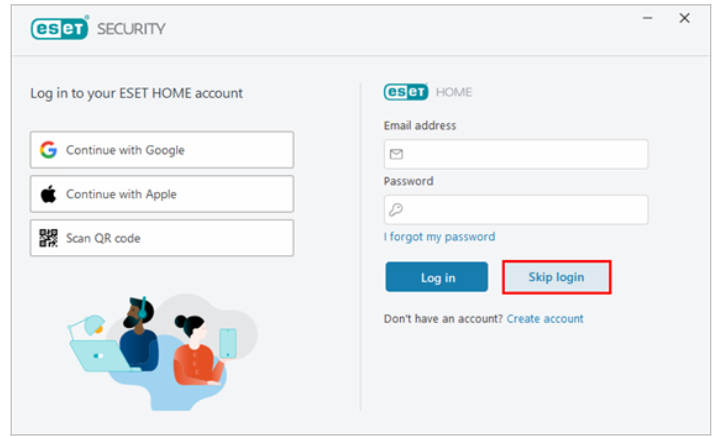
3. After skipping login you’ll be asked to activate, select ‘use a purchased activation key’. 
Activation key :


Did you find it helpful? Yes No

Send feedback
Sorry we couldn't be helpful. Help us improve this article with your feedback.

Related Articles

    Home Solutions Cookie policy
    Help Desk Software by Freshdesk
    Article views count